Refreshing the blog — again

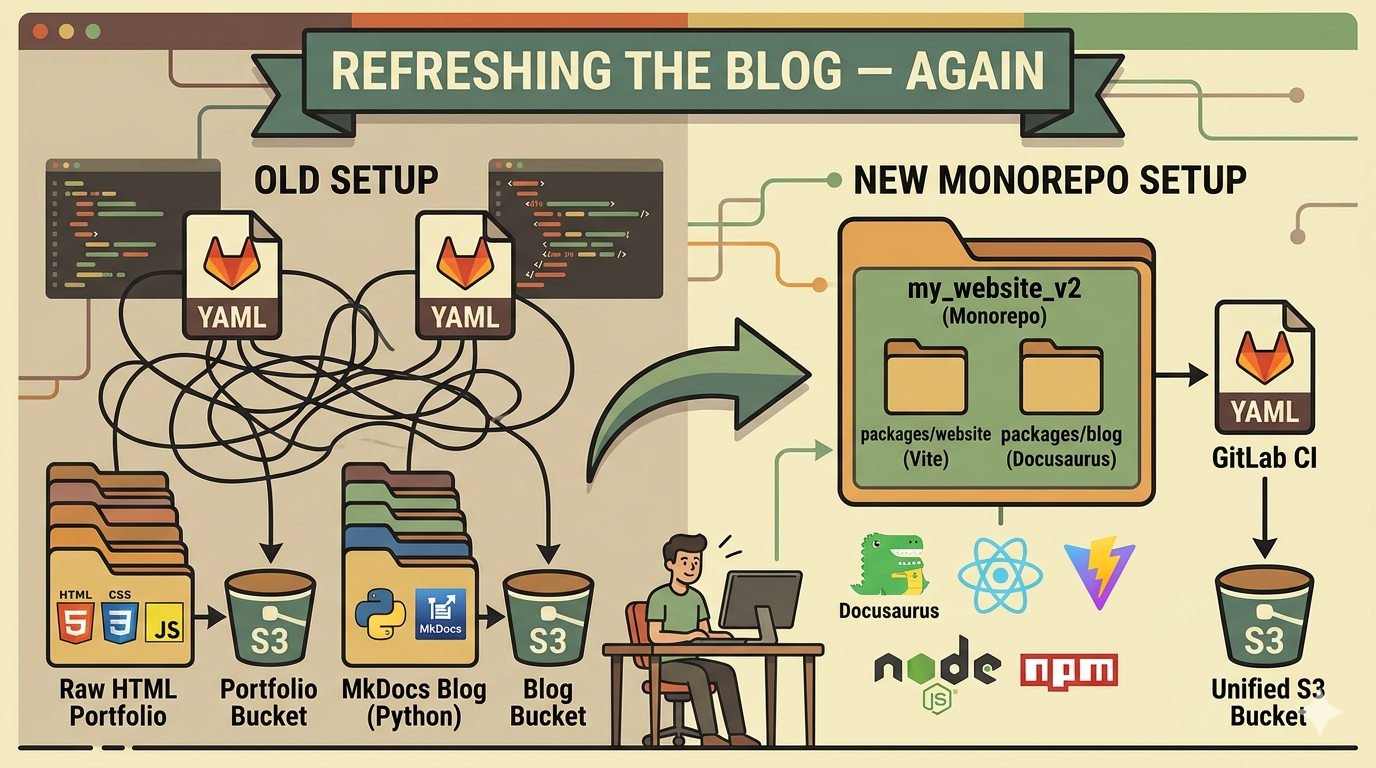
A while ago I wrote a blog post about how I created this blog. Back then it was Pelican, a Python static site generator. Then I migrated it to MkDocs — also Python, a bit more modern, better support for my bilingual setup. Now here we are again. Third time.
This is the story of why I did it and how it went.
If you are reading this on the blog, it means the migration is done. Congratulations, you survived the downtime.
The old setup
Let me describe what I had before so you understand why I wanted to change it.
The portfolio
A raw HTML/CSS/JavaScript website. No build step. No bundler. Just files on a disk that I uploaded to S3.
It worked. But it was painful to maintain. All the CSS was in one 600-line file mixing colors, layout and components. There was no clear separation between data and presentation. The JavaScript was procedural, with eval() calls to map string property names to DOM attributes. Dependencies were pulled from CDNs with hardcoded version numbers in <script> tags.
Every time I needed to touch something I had to rediscover how it was put together.
The blog
MkDocs is a perfectly fine static site generator. I have nothing bad to say about it. But it was a separate project, with its own Python environment, its own GitLab CI pipeline, and its own S3 deployment. Two projects, two pipelines, two deployment processes.
And MkDocs is not really designed for a blog. I was using the MkDocs Material Blog plugin which is great but adds a layer on top of something that wasn't built for that use case from the start.
The CI situation
Two .gitlab-ci.yml files. Two separate cache strategies. Two separate deploy jobs. When I wanted to make a change that touched both the portfolio and the blog — like updating the footer links — I had to coordinate two separate pipelines and two separate deployments. It was annoying.
Why Docusaurus and Vite
Docusaurus
Docusaurus is a React-based static site generator made by Meta, primarily designed for documentation. But it has a blog mode that is quite good. It supports:
- Bilingual content out of the box with its i18n system
- Reading time estimation
- Author profiles
- RSS/Atom feeds
- Tag pages
It's built on top of Node.js and npm, which means I'm back in the ecosystem I hate but at least it's the same ecosystem as the portfolio build tooling. Consistency has a value.
I considered Astro and 11ty. Astro is interesting but it felt like more configuration for the same result. 11ty is elegant in its simplicity but the Docusaurus i18n support is hard to beat without writing it yourself.
Vite
Vite is the obvious choice for the portfolio. It's fast, it handles multi-page apps well, and it has first-class support for ES modules. The migration from raw HTML + procedural JavaScript to a proper Vite multi-page app gave me the structure I needed without forcing me to adopt a component framework.
The monorepo structure
The decision to merge the two projects into one repository was the most important one. Everything else follows from it.
my_website_v2/
├── package.json          # npm workspaces root
├── packages/
│   ├── website/          # Vite portfolio
│   └── blog/             # Docusaurus blog
└── dist/                 # assembled output
The root package.json declares both packages as npm workspaces and orchestrates the build:
{
  "scripts": {
    "build": "npm run build:website && npm run build:blog && npm run assemble",
    "assemble": "mkdir -p dist && cp -r packages/website/dist/. dist/ && mkdir -p dist/blog && cp -r packages/blog/build/. dist/blog/"
  }
}
The portfolio builds into dist/, the blog builds into dist/blog/. The URL structure is preserved: / for the portfolio, /blog/ for the blog. One rclone sync command on the CI to push everything to S3.
Migrating the portfolio
CSS refactor
The first thing I did was extract the Gruvbox color palette into CSS custom properties:
:root {
  --gb-bg:      #1d2021;
  --gb-bg1:     #282828;
  --gb-fg:      #ebdbb2;
  --gb-cyan:    #689d6a;
  --gb-yellow:  #d79921;
  /* ... */
}
Then replaced every hardcoded color literal in the component stylesheets with these variables. No visual change, but now the theme is in one place.
JavaScript modules
The main challenge was the eval() pattern. The original code used string property names to set dynamic CSS variables:
// Before
config.forEach(function(item) {
  Object.keys(item).forEach(function(key) {
    eval("element." + key + " = item[key]");
  });
});
I replaced this with an explicit property map:
// After
const PROPERTY_MAP = {
  textContent: (el, v) => { el.textContent = v },
  href: (el, v) => { el.href = v },
  style: (el, v) => { el.setAttribute('style', v) },
};
Not as clever, but it works without eval() and it's readable.
UAParser.js
The portfolio uses UAParser.js to display the visitor's browser and OS on the terminal homepage. Before it was loaded from a CDN:
<script src="https://cdn.jsdelivr.net/npm/ua-parser-js@1/src/ua-parser.min.js"></script>
Now it's a proper npm dependency imported as an ES module:
import { UAParser } from 'ua-parser-js'
Migrating the blog content
The migration script
I wrote a one-shot Node.js script to migrate all the MkDocs posts to Docusaurus format. The main things it had to handle:
Frontmatter: MkDocs Material uses categories and tags as separate fields, Docusaurus only has tags. The script merges them and deduplicates. It also removes the readtime field since Docusaurus computes reading time automatically.
Admonitions: MkDocs uses !!! warning "Title" syntax, Docusaurus uses :::warning[Title]. A regex handles the conversion:
content = content.replace(
  /^!!!\s+(\w+)(?:\s+"([^"]*)")?\n\n?((?:(?:    |\t)[^\n]*\n?)+)/gm,
  (_, type, title, body) => {
    const dedented = body.replace(/^(    |\t)/gm, '')
    const header = title ? `:::${type}[${title}]` : `:::${type}`
    return `${header}\n${dedented.trim()}\n:::\n`
  }
)
Directory structure: MkDocs posts are in docs/en/posts/slug/index.md with no date in the path. Docusaurus wants blog/YYYY-MM-DD-slug/index.md. The script reads the date: field from frontmatter and prefixes the directory name.
Truncation markers: MkDocs uses <!-- more --> for the post excerpt cutoff. Docusaurus uses <!-- truncate -->. A simple find and replace.
Bilingual content
The EN posts go in packages/blog/blog/. The FR posts go in packages/blog/i18n/fr/docusaurus-plugin-content-blog/. Images are stored with the EN post and FR posts reference them with the same relative path — Docusaurus resolves them correctly at build time.
The fun problems
Node 25 and the localStorage error
The Docusaurus SSG build crashed on Node.js 25 with:
Cannot initialize local storage without a --localstorage-file path.
Node.js 25 ships the Web Storage API natively, but unlike browsers, it requires an explicit file path to persist data. Docusaurus uses localStorage internally during SSG for theme persistence and had no idea this API now needed initialization.
The fix is a Node.js CLI flag:
NODE_OPTIONS='--localstorage-file=/tmp/docusaurus-ls' docusaurus build
It's in the package.json build script and in the GitLab CI variables block.
Non-breaking spaces
HTML collapses consecutive regular spaces into one. Everyone knows that. Fewer people remember it when writing strings that will be injected as innerHTML.
The terminal homepage has two commands whose output relies on column alignment: locate (links padded to a common width before the # comment) and ls -l /bin (file sizes and dates right-aligned). The original source used U+00A0 non-breaking spaces for that padding, not regular spaces. In HTML, or its Unicode equivalent is the only whitespace character that does not collapse.
During the migration, every text editor, diff tool, and copy-paste involved in moving those strings treated U+00A0 as an ordinary space. They all came out as U+0020. The columns disappeared silently — no build error, no test failure, just a cosmetic regression that you only notice when you look at the page.
The fix is surgical: find the original source, extract the raw bytes, restore them. A one-liner in Python to grep the original file and count \xa0 occurrences confirmed it, then a direct byte-level substitution put them back.
Lesson: if column alignment in HTML matters, use a <pre> or white-space: pre and keep the string in a separate file where a linter cannot touch it.
webpack 5.106 and webpackbar
Docusaurus 3 uses webpack 5 internally. webpackbar — the progress bar plugin — was updated to 6.0.1, which passed options (name, color, reporters) to webpack's ProgressPlugin. But webpack 5.100+ removed those options from ProgressPlugin.
The result: the blog build crashed at startup with an obscure plugin options error.
The fix was to pin webpack to 5.95.0 as a direct devDependency in packages/blog/package.json. npm workspace resolution picks it up and uses it instead of resolving the latest 5.x version.
{
  "devDependencies": {
    "webpack": "5.95.0"
  }
}
Not great, but it works until Docusaurus ships a fix upstream.
The CI pipeline
The new .gitlab-ci.yml is three stages: install, build, deploy.
install → build → pages (develop branch)
                → publish (master branch)
The pages job copies dist/ to public/ for GitLab Pages on the develop branch. The publish job runs rclone sync to push dist/ to S3 on the master branch.
Before this, I had two pipelines with two separate S3 deploy jobs, one of which used an exclusion pattern to avoid overwriting the blog that was deployed from the other pipeline. Now it's a single rclone sync with no exclusions:
rclone sync --checksum --delete-during --quiet \
  --s3-provider AWS \
  --s3-access-key-id "$AWS_ACCESS_KEY_ID" \
  --s3-secret-access-key "$AWS_SECRET_ACCESS_KEY" \
  --s3-region eu-west-3 \
  ./dist :s3:website-lunik.tiwabbit.fr
--delete-during removes files from the bucket that no longer exist in dist/ as the sync runs. --checksum uses checksums rather than modification times to detect changes — more reliable for files that get reassembled from the same source. Clean.
Conclusion
Three iterations of this blog. Pelican, then MkDocs, now Docusaurus. Each time the tooling gets better and the maintenance overhead gets lower.
The monorepo was the right call. Having the portfolio and the blog in the same repository, with the same build pipeline, is genuinely less annoying than maintaining two separate projects. I should have done it earlier.
The source is at gitlab.com/Lunik/my_website_v2.