---
title: Securing web entrypoint from external threats
date: 2021-10-13
slug: secure-home-entrypoint
authors:
- lunik
description: I'm explaining how I have secured a web entrypoint from external threats
related_posts:
- manage-x509-certs
- understanding-totp
- ssh-ca-authentication
tags:
- gateway
- web
- security
- firewall
- network
- networking
- nginx
- fail2ban
- ssl
- tls
- certificate
---

I'm currently hosting some private web services accessible from internet. In order to protect those apps, I needed a very secure way to protect the access to them.
As you may already know, there are tons of bots that continuously scan all public internet IPs for potential vulnerabilities. From open ports, insecure web services or security breach.
There are private organizations that allow to discover those vulnerabilities like [Shodan][shodan-website]. In my particular case, this is the only information that they could collect from my IP gateway :
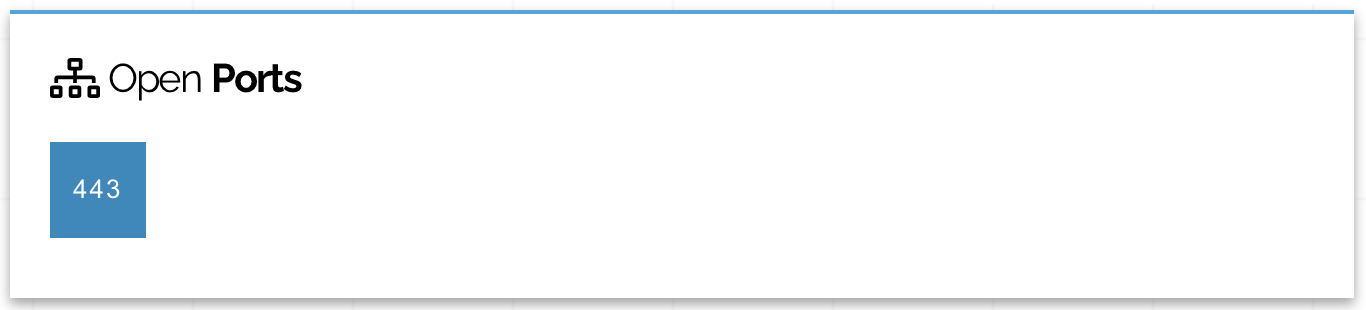
So I need to expose my services and access them from anywhere on internet without too much complexity while making sure I'm the only on that can use them and nobody else could access my data.
## Theory
I'm using [Zero trust security model][zero-trust-security-wikipedia]. So by default no one and no device are trusted.
The first step is to set firewall to drop all incoming traffic, close all network port, disable login for all users, remove all unnecessary package and running demons.
> **Warning :** You need to be extremely careful when you close everything or you could be locked out of your network/server without possibility to regain access.
## Layout
So this is a Top Level View of my network layout :
**Internet** --> **Public IP** --> **Firewall** --> **Gateway Server** --> **Ingress service** --> **Private Network**
## Implementation
### Step by step
#### Public IP
Well here there is not much to secure. The IP is statically provided by my [ISP][isp-wikipedia] and is publicly available and reachable.
#### Firewall
This device if the first line of security.
As mentioned before, I'm using [Zero trust security model][zero-trust-security-wikipedia], so the first step is to drop all incoming traffic by default.
Now nobody can reach me from the outside but the returning traffic can't either. When I make a request to an outside service, the returned data is dropped ate the firewall level. Not very useful indeed.
The second step is then to allow returning traffic (while keep dropping all other traffic). I can be done with simple [Network Address Translation or NAT][nat-wikipedia]. This way when a server within the private network make a request to a public service, the response can flow trough the firewall securely. This can come handy if you want to update packages on your server !
All firewall support natively [NAT][nat-wikipedia] so it's not very hard to activate it.
Then I want to allow public access to my services which expose [HTTPS][https-rfc] ports, so `443/tcp`. I have enabled [port forwarding][port-forwarding-wikipedia] on my firewall so that when incoming traffic/request arrive on the port `443` with the [TCP][tcp-rfc] protocol, it is forwarded to my gateway server within my private network.
> **Note:** The port exposed by my gateway server has no impact on the forward rule. It could be `443` to be coherent or it could be `8888`. It doesn't matter.
#### Gateway Server
My current gateway server is a [Linux][linux-wikipedia] based server. The distribution used in my case is irrelevant.
##### Local firewall
It ship with [firewalld][firewalld-website] pre-installed witch allow me to have a local firewall on my server. Since my gateway receive traffic from the outside world, I need to control what can enter and leave this server.
For my setup I choose to keep it simple. I'm only allowing incoming traffic from port `443/tcp` (and `22/tcp` from my private network to administrate the server with [SSH][ssh-rfc]). Then I'm allowing outgoing traffic (like [NAT][nat-wikipedia]) for the returning flux.
With the [firewalld][firewalld-website] following command line I can see my current configuration :
```shell
firewall-cmd --zone public --list-all
```
I get :
```shell
public (active)
target: default
icmp-block-inversion: no
interfaces: eth0
sources:
services: https ssh
ports:
protocols:
forward: no
masquerade: no
forward-ports:
source-ports:
icmp-blocks:
rich rules:
```
#### Ingress service
I'm using [NGINX][nginx-website] as my ingress service. It runs on my gateway server.
His purpose is to route and filter incoming [HTTPS][https-rfc] traffic.
##### Filter non wanted traffic
First step is to filter out all [HTTPS][https-rfc] that is not going to my exposed service. A simple first step is to drop by default all incoming requests. In a default site configuration `/etc/nginx/conf.d/default.conf`, I have :
```nginx
server {
listen 443 default_server ssl;
server_name _;
return 444;
}
```
The first line with le `listen` keyword tells [NGINX][nginx-website] to listen on port `443` and to begin a secure connexion with the client.
In this configuration `server_name _;` match all/undefined [Server Name Identification or SNI][sni-wikipedia] within incoming requests.
The `return 444;` line return the [HTTP code][http-code-wikipedia] `444` which tells [NGINX][nginx-website] to close the connection immediately.
Since I'm using [HTTPS][https-rfc], I need to provide a [X.509 certificate][x509-certificate-wikipedia] for [TLS][tls-1.3-rfc] communications. I made a little joke on this one because, you know, if you are a stranger trying to access my private stuff _GTFO_. This give me :
```nginx
server {
listen 443 default_server ssl;
server_name _;
ssl_certificate /etc/pki/tls/certs/go.fuck.yourself.now.crt;
ssl_certificate_key /etc/pki/tls/private/go.fuck.yourself.now.key;
return 444;
}
```
I'm currently using a overkill [RSA][rsa-2.2-rfc] `4096` bits long private key.
Now if I try to make a dumb request to my ingress service like :
```shell
curl \
--insecure \
--verbose \
--header "Host: dumb.example.org" \
https://mygateway.local
```
I get :
```shell
* Trying XXX.XXX.XXX.XXX...
* TCP_NODELAY set
* Connected to mygateway.local (XXX.XXX.XXX.XXX) port 443 (#0)
* ALPN, offering h2
* ALPN, offering http/1.1
* successfully set certificate verify locations:
* CAfile: /etc/ssl/cert.pem
CApath: none
* TLSv1.2 (OUT), TLS handshake, Client hello (1):
* TLSv1.2 (IN), TLS handshake, Server hello (2):
* TLSv1.2 (IN), TLS handshake, Certificate (11):
* TLSv1.2 (IN), TLS handshake, Server key exchange (12):
* TLSv1.2 (IN), TLS handshake, Server finished (14):
* TLSv1.2 (OUT), TLS handshake, Client key exchange (16):
* TLSv1.2 (OUT), TLS change cipher, Change cipher spec (1):
* TLSv1.2 (OUT), TLS handshake, Finished (20):
* TLSv1.2 (IN), TLS change cipher, Change cipher spec (1):
* TLSv1.2 (IN), TLS handshake, Finished (20):
* SSL connection using TLSv1.2 / ECDHE-RSA-AES256-GCM-SHA384
* ALPN, server accepted to use http/1.1
* Server certificate:
* subject: C=FR; L=Paris; O=Wabbit; CN=go.fuck.yourself.now; emailAddress=admin@wabbit
* start date: May 29 15:55:36 2021 GMT
* expire date: May 29 15:55:36 2022 GMT
* issuer: C=FR; L=Paris; O=Wabbit; CN=wabbit; emailAddress=admin@wabbit
* SSL certificate verify ok.
> GET / HTTP/1.1
> Host: dumb.example.org
> User-Agent: curl/7.64.1
> Accept: */*
>
* Empty reply from server
* Connection #0 to host mygateway.local left intact
curl: (52) Empty reply from server
* Closing connection 0
```
My ingress server send me the certificate with Common Name `go.fuck.yourself.now` for secure communication. My client make a `GET` request on the `/` URI path with the host `dumb.example.org`.
Since my ingress server is not configured to accept request for any service with the name `dumb.example.org`, it close the connexion without warning and my client get an `Empty reply from server`.
##### Enhance secure connexion
By default [NGINX][nginx-website] is very open in term of protocols and cipher allowed to make secure connexion. Inside the [NGINX][nginx-website] main configuration file, located at `/etc/nginx/nginx.conf`, in the `http` section, I have replaced the `ssl_` options with :
```nginx
ssl_protocols TLSv1.2 TLSv1.3;
ssl_prefer_server_ciphers on;
ssl_ciphers HIGH:!aNULL:!MD5;
```
Now my ingress service will only allow only [TLS][tls-1.3-rfc] `1.2` minimum (up to `1.3`) with only `HIGH`, not `NULL` and not `MD5` ciphers to establish secure connexions with the client. The `ssl_prefer_server_ciphers` for the client to tries ciphers with the order provided by the ingress service.
[Additional TLS recomendations][tls-recomendations-ssi-gouv]
##### Log everything
By default [NGINX][nginx-website] logs all request inside the `/var/log/nginx/access.log` file and all errors in `/var/log/nginx/error.log`. I have checked if it is the case for my instance. In the main configuration file `/etc/nginx/nginx.conf`, I have :
```nginx
error_log /var/log/nginx/error.log;
```
and :
```nginx
log_format main '$remote_addr - $remote_user [$time_local] "$request" '
'$status $body_bytes_sent "$http_referer" '
'"$http_user_agent" "$http_x_forwarded_for"';
access_log /var/log/nginx/access.log main;
```
In `/var/log/nginx/access.log` I can see my test request from earlier :
```shell
XXX.XXX.XXX.XXX - - [10/Oct/2021:15:55:36 +0000] "GET / HTTP/1.1" 444 0 "-" "curl/7.64.1" "-"
```
##### Expose service
Now that I have all my connexions filtered, I want to expose my services. To do that I added a new config file inside `/etc/nginx/conf.d` with the following content :
```nginx
server {
listen 443 ssl;
server_name myapp.example.org;
ssl_certificate /etc/pki/tls/certs/myapp.example.org.crt;
ssl_certificate_key /etc/pki/tls/private/myapp.example.org.key;
location / {
proxy_pass https://myapp.local;
proxy_set_header Host $host;
proxy_set_header X-Real-IP $remote_addr;
proxy_set_header X-Forwarded-For $proxy_add_x_forwarded_for;
}
}
```
If a request arrives with the [SNI][sni-wikipedia] `myapp.example.org` it get accepted by the ingress service. [NGINX][nginx-website] is going to use the provided `myapp.example.org.crt` certificate to establish secure connexion with the client. Then it will forward all the traffic to my private app at `https://myapp.local` using [NGINX proxy configuration][nginx-proxy-config].
##### Identifying clients
Since I want to access my apps from anywhere outside my private network, I need to allow incoming requests from any potential public IPs.
But I still want to be able to identify my devices among all public IPs.
I have decided to implement [client certificate][client-certicate-wikipedia] authentication. I have generated a unique private [X.509 certificate][x509-certificate-wikipedia] for each of my devices (PC, phone, ...) and installed them.
I have then configured my ingress service to request [client certificate][client-certicate-wikipedia] when a client wish to access an exposed service. Enhancing the previous configuration I get :
```nginx
server {
listen 443 ssl;
server_name myapp.example.org;
ssl_certificate /etc/pki/tls/certs/myapp.example.org.crt;
ssl_certificate_key /etc/pki/tls/private/myapp.example.org.key;
# make verification optional, so we can display a 403 message to those
# who fail authentication
ssl_verify_client on;
ssl_client_certificate /etc/pki/tls/certs/users.example.org.crt;
location / {
proxy_pass https://myapp.local;
proxy_set_header Host $host;
proxy_set_header X-Real-IP $remote_addr;
proxy_set_header X-Forwarded-For $proxy_add_x_forwarded_for;
}
}
```
`ssl_verify_client` force user to provide a [client certificate][client-certicate-wikipedia] for authentication. If not, the connexion is closed with code `400`.
`ssl_certificate_key` provides the [Certificate Authority or CA][certificate-authority-wikipedia] who have signed the clients certificates.
Now if I try to make a request on `myapp.example.org` without the [client certificate][client-certicate-wikipedia] :
```shell
curl \
--insecure \
--include \
https://myapp.example.org
```
I get :
```shell
HTTP/1.1 400 Bad Request
Server: nginx/1.20.1
Date: Sun, 10 Oct 2021 17:35:05 GMT
Content-Type: text/html
Content-Length: 237
Connection: close
400 No required SSL certificate was sent
400 Bad Request
No required SSL certificate was sent
nginx/1.20.1
```
The ingress server reject my request with code `400` because I have not provided the required [client certificate][client-certicate-wikipedia].
Let's try again while providing the [client certificate][client-certicate-wikipedia] :
```shell
curl \
--insecure \
--include \
--cert lunik.pem \
https://myapp.example.org
```
I get :
```shell
HTTP/1.1 302 Found
Server: nginx/1.20.1
Date: Sun, 10 Oct 2021 17:35:36 GMT
Content-Type: text/plain; charset=utf-8
Content-Length: 30
Connection: keep-alive
Content-Language: en
Location: /login
Referrer-Policy: same-origin
Vary: Accept, Accept-Encoding
X-Content-Type-Options: nosniff
X-Frame-Options: deny
X-Xss-Protection: 1; mode=block
Found. Redirecting to /login
```
It works !
#### Fail2ban
Now that I can securely access my private services, I still want to prevent unwanted users or bots to [brute force][brute-force-wikipedia] or [DDOS][ddos-wikipedia] my gateway server.
I'm currently using [Fail2ban][fail2ban-website] to block those behaviours. It constantly scan my ingress service access logs to identify malicious requests made by public clients.
I have created a custom `filter` that match all request returning with a `444` code. If you remember well this code is returned by my [NGINX][nginx-website] configuration if client request an unknown [SNI][sni-wikipedia].
The filter configuration (`/etc/fail2ban/filter.d/nginx-444.conf`) looks like :
```toml
[Definition]
failregex = ^.*"(\w+).*" (444) .*$
```
Then I have a `jail` that implement this `filter`. The `/etc/fail2ban/jail.d/block-malicious-users.conf` contains :
```toml
[DEFAULT]
ignoreip = 127.0.0.1 XXX.XXX.XXX.XXX YYY.YYY.YYY.YYY
findtime = 3600
bantime = 31536000
maxretry = 1
[nginx-444]
enabled = true
logpath = /var/log/nginx/*.log
# Ban IP
action = %(banaction_allports)s
```
If [Fail2ban][fail2ban-website] found, in the `logpath` file at least `maxretry` failed attempts in a `findtime` window of time. It will ban the IP for `bantime` seconds.
> **Notes:** I have ignored the localhost address, my administration PC IP (`XXX.XXX.XXX.XXX`) and the gateway public IP `YYY.YYY.YYY.YYY` to prevent [Fail2ban][fail2ban-website] from banning myself when I'm testing the setup.
##### Check banned IPs
I can already see banned clients from previous failed requests. When using [Fail2ban][fail2ban-website] status command :
```shell
fail2ban-client status nginx-444
```
I get :
```shell
Status for the jail: nginx-444
|- Filter
| |- Currently failed: 0
| |- Total failed: 3
| `- File list: /var/log/nginx/error.log /var/log/nginx/custom-access.log /var/log/nginx/access.log
`- Actions
|- Currently banned: 3
|- Total banned: 3
`- Banned IP list: XXX.XXX.XXX.XXX YYY.YYY.YYY.YYY ZZZ.ZZZ.ZZZ.ZZZ
```
Checking [firewalld][firewalld-website] for drop rules from those IPs with command :
```shell
firewall-cmd --zone public --list-all
```
I get :
```shell
public (active)
target: default
icmp-block-inversion: no
interfaces: eth0
sources:
services: dhcpv6-client https mdns ssh
ports:
protocols:
forward: no
masquerade: no
forward-ports:
source-ports:
icmp-blocks:
rich rules:
rule family="ipv4" source address="XXX.XXX.XXX.XXX" port port="0-65535" protocol="tcp" reject type="icmp-port-unreachable"
rule family="ipv4" source address="YYY.YYY.YYY.YYY" port port="0-65535" protocol="tcp" reject type="icmp-port-unreachable"
rule family="ipv4" source address="ZZZ.ZZZ.ZZZ.ZZZ" port port="0-65535" protocol="tcp" reject type="icmp-port-unreachable"
```
Looks good !
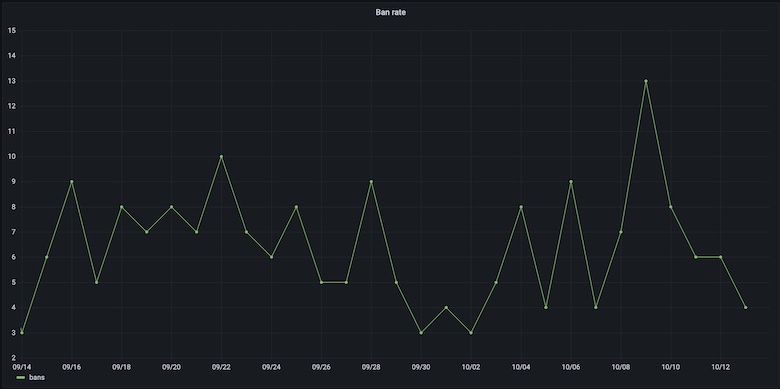
I usually ban around `6.5` IP per day :
### Conclusion
On each of my entrypoint layers I have implemented :
- **Firewall :**
- Drop all incoming traffic
- [NAT][nat-wikipedia]
- [Port forwarding][port-forwarding-wikipedia] on port `443/tcp`
- **Gateway Server :**
- Enable [Firewalld][firewalld-website]
- Drop all incoming and outgoing traffic
- Allow incoming traffic on port `443/tcp`
- Enable [NAT][nat-wikipedia] to keep packages up to date
- Enable [Fail2ban][fail2ban-website]
- Ban IPs that request unknown [SNI][sni-wikipedia]
- **Ingress service :**
- Drop all traffic with unknown [SNI][sni-wikipedia]
- Use only secure [TLS][tls-1.3-rfc] protocols and ciphers
- Enforce [client certificate][client-certicate-wikipedia] for authentication
- Use state of the art [X.509 certificates][x509-certificate-wikipedia]
[brute-force-wikipedia]: https://en.wikipedia.org/wiki/Brute-force_attack
[certificate-authority-wikipedia]: https://en.wikipedia.org/wiki/Certificate_authority
[client-certicate-wikipedia]: https://en.wikipedia.org/wiki/Client_certificate
[ddos-wikipedia]: https://en.wikipedia.org/wiki/Denial-of-service_attack
[fail2ban-website]: https://www.fail2ban.org
[firewalld-website]: https://firewalld.org
[http-code-wikipedia]: https://en.wikipedia.org/wiki/List_of_HTTP_status_codes
[https-rfc]: https://tools.ietf.org/html/rfc2818
[isp-wikipedia]: https://en.wikipedia.org/wiki/Internet_service_provider
[linux-wikipedia]: https://en.wikipedia.org/wiki/Linux
[nat-wikipedia]: https://en.wikipedia.org/wiki/Network_address_translation
[nginx-proxy-config]: https://docs.nginx.com/nginx/admin-guide/web-server/reverse-proxy/
[nginx-website]: https://www.nginx.com
[port-forwarding-wikipedia]: https://en.wikipedia.org/wiki/Port_forwarding
[rsa-2.2-rfc]: https://tools.ietf.org/html/rfc8017
[shodan-website]: https://www.shodan.io
[sni-wikipedia]: https://en.wikipedia.org/wiki/Server_Name_Indication
[ssh-rfc]: https://tools.ietf.org/html/rfc4253
[tcp-rfc]: https://tools.ietf.org/html/rfc793
[tls-1.3-rfc]: https://tools.ietf.org/html/rfc8446
[tls-recomendations-ssi-gouv]: https://www.ssi.gouv.fr/uploads/2017/02/security-recommendations-for-tls_v1.1.pdf
[x509-certificate-wikipedia]: https://en.wikipedia.org/wiki/X.509
[zero-trust-security-wikipedia]: https://en.wikipedia.org/wiki/Zero_trust_security_model